

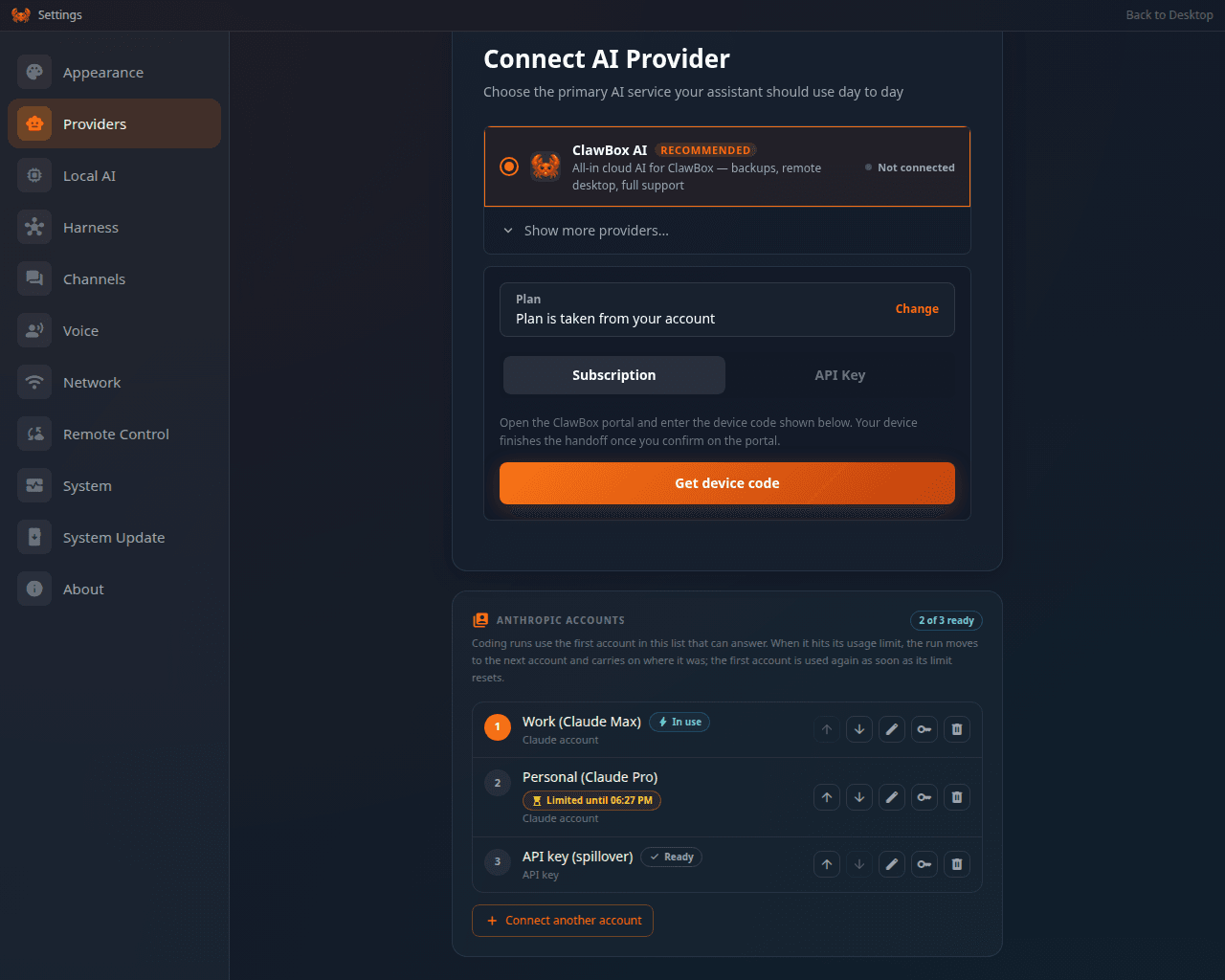
Settings → Providers → Anthropic accounts, in the order the box tries them
The accounts do not choose which AI answers in the chat. That is still the provider
at the top of Settings → Providers (see
Choose Your AI Provider). When the chat runs on a Claude
subscription, it runs on the active account from this list once the box has had to
switch accounts for the first time. Connecting an account never replaces the sign-in the
chat already uses by itself.
How the fallback works
- One account at a time, for everything. The box starts on the first account in the list that can answer. It never takes turns (round-robin).
- A limit moves everything; it doesn’t end anything. Claude Code reports a limit in
its own words, like “You’ve hit your weekly limit · resets Mon 9am”. Whichever part
of the box sees it first (a coding run, the chat, a scheduled task), the box notes when
the account is back and switches every part to the next account at once:
- coding runs, review passes and team workers still on the old account are stopped and resumed in the same session on the new one. The branch, the commits and the pull request stay the same.
- the chat’s Claude subscription is switched and the gateway restarts on it, for every agent and every conversation.
- a message you sent in the desktop chat, a scheduled task or a check-in that failed on the limit is sent again once on the new account. A message that came in on a channel (Telegram and the like) is not sent again: send it once more yourself, and it goes through on the new account.
- A refused sign-in moves everything too. If Anthropic refuses an account (a 401, a revoked sign-in or key), the box first checks with Anthropic. If the sign-in really is dead, the account is marked Needs re-authentication and everything moves on. If it was only a stale token, the account stays in use.
- The box stays where it moved to. When the first account’s limit resets, the box keeps using the account it switched to until that one runs out too. That saves a restart of the chat for nothing. To go back to the first account as soon as it resets, turn on Return to the first account once its limit resets. To switch by hand at any time, move an account to the top of the list: the first account that can answer becomes the active one.
- When every account is limited, work waits. The card says All accounts limited, earliest reset 22:50. A coding run that cannot continue is paused, not failed, and shows Waiting. A failed desktop-chat message, scheduled task or check-in is held. At the first reset the box switches to that account and resumes all of it without you pressing anything. Until then, a new coding run is refused with the reset time rather than started and cut off.
- Only a usage cap or a refused sign-in counts. This covers the session (five-hour) window, the weekly cap, an API key’s rate limit, a prepaid key with no credit left and Anthropic refusing the credential. Any other failure is a real failure and is not passed from account to account.
- A brief rate limit is not a cap. When the chat or a scheduled task gets a plain “rate limited” from Anthropic, with no reset time and no “usage limit” in it, the box keeps the account and sends the message again a minute later. Only when the same account is rate limited again within ten minutes does the box treat it as capped and switch.
Connect your accounts
1
Open the list
Go to Settings → Providers and scroll to the Anthropic accounts card, at the
bottom of the page.
2
Connect a Claude account
Press Connect an account. Once you have one, the button reads Connect another
account. Give it a name if you like, such as Work Max. The name is how the box
refers to the account in notices and in the run timeline.
3
Sign in with Claude
Sign in with Claude opens Anthropic’s sign-in page in a new tab. Sign in with the
account you want to add and approve access. Anthropic then shows a code: paste it into
the card and press Connect.
4
Add the next one
Repeat the steps with a different Claude account. Sign out of the first one on
claude.ai first, or use a private window, or Anthropic will sign you in as the same
account again.
API keys and the Terminal sign-in
- An Anthropic API key. In the connect panel, choose Use an API key instead and
paste the key (it starts with
sk-ant-). The box checks it with Anthropic and refuses it only if Anthropic says no. If Anthropic cannot be reached, the key is saved and the first run that uses it checks it. - The box’s own Claude Code sign-in. If you signed in by running
claudein the Terminal app, the box adds that sign-in to the list by itself. It is renewed in the Terminal, not here. Removing it only takes it off the list, and Add this box’s Claude Code sign-in puts it back. - A key you saved before. An Anthropic API key already saved in the Coding Agent app became account #1 automatically when your box updated. You don’t have to re-enter it.
Order and manage them
Each row shows the account’s place in the order, its name, the Anthropic account it belongs to and its state. The badge at the top of the card sums it up: 2 of 3 ready, or All limited · back at 22:50.What you see when a limit hits
- On the card: a line naming the account new coding runs start on and the one the chat is on (or that the chat keeps its own sign-in until the first switch), and a Last swap panel: when it happened, from which account to which, why (Usage limit, back at 22:50, Anthropic refused the sign-in, Your change…), and what each part of the box did: Coding runs: 2 carried on, Chat and scheduled tasks: switched, Failed turns: 1 sent again.
- In the run’s timeline: Anthropic account “Work Max” hit its usage limit (back at 22:50); carrying on with “Personal Max” in the same session. A run moved because the chat or another run hit the limit first says Anthropic account “Work Max” can no longer answer; carrying on with “Personal Max” in the same session.
- In the chat, under the failed message: That Claude account could not answer, so ClawBox moved everything that uses Claude to Personal Max and sent your message again.
- A notice on the desktop, and in your Telegram chat if you connected a bot. There are two kinds: one when an account is set aside (limited or refused) and the box switches, and one when no account is left. Pressing the desktop notice opens Settings → Providers. You get no notice when the box goes back to your first account, or when you switch by hand.
- On a waiting run’s card: Waiting: every Anthropic account on this box is at its usage limit. It carries on by itself at 22:50. You don’t need to press Resume.
Try it with two accounts
- Connect two Claude accounts (or a Claude account and an API key) on the card.
- In Settings → Providers, pick a Claude model for the chat with Sign in with Claude, so the chat runs on a Claude subscription.
- Start a coding run and send a chat message.
- Move account #2 to the top of the list. The Last swap panel shows Your change, and the chat restarts on account #2. A run already working on account #1 finishes there, because that account can still answer.
- To see a real limit’s path without waiting for one, the owner-only test hook
POST /setup-api/anthropic/accountswith{"action":"simulate_limit","id":"<account id>"}sets the account aside for 30 minutes. Runs on it are stopped and resumed on the next account, the chat is switched, and you get the notice.
The assistant knows too
The assistant reads the same list with theanthropic_accounts tool: how many accounts
can answer, which one is in use, when a limited one is back and why the last swap
happened. It uses this before starting or retrying a coding run. When every account is limited, it waits for the reset
instead of spending attempts. The tool can only read: adding, removing and ordering
accounts needs your signed-in browser session. See
Agent Interface.
Privacy and security
- Keys and sign-in tokens are stored encrypted in the box’s secret store. They are never written to its configuration file, to logs, to run records or to pull requests, and the card never shows one again after you save it.
- The card shows each account’s name, the email address Anthropic reported for it and its state. The assistant gets the names and states only: no email and no credential.
- Only you can change the list, from the box’s own pages while signed in. The assistant, and any page on another site, is refused.
Each account is used under its own Anthropic plan and terms. Connect accounts you are
entitled to use.